
LëtzPay
ENFRDE

Annual tax check · test preview

Your year.
A clearer picture.

Your salary certificate arrives. Make sense of the figures, one small step at a time.

Built around working in Luxembourg and living across the border. Read, check and explore a possible refund or payment.

Follow an example

Tax estimates in early access. Available in the Android closed alpha. Use your own figures or try a fictional example. Estimates are not ACD assessments and the app does not file your return. The iPhone version is still in local testing.

Update to the latest alpha to follow this guide. Availability depends on Google Play review and rollout.

Request tax alpha access
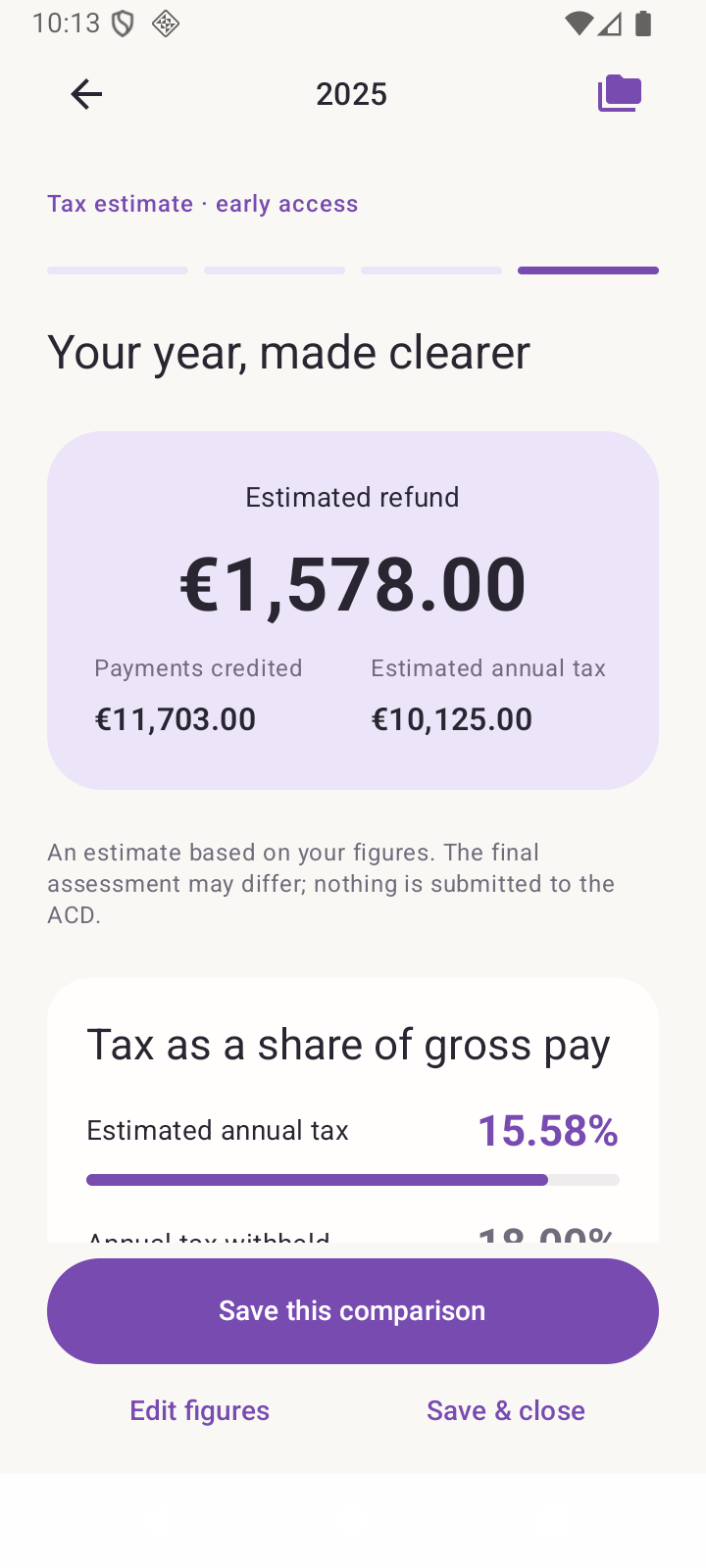
The actual Android tax preview shows an example refund, tax already paid and estimated annual tax.
Actual alpha app · English interface · fictional figures

Meet Alex

Home in Germany.
Salary from Luxembourg.

Alex is single and worked in Luxembourg throughout 2025. This fictional example includes the confirmed household and filing facts required by the preview.

Annual gross salary
€65,000
Deductible contributions
€7,600
Tax withheld
€12,000

The sample also includes €225 CIS and €72 CO₂ credits already paid through payroll. These figures describe this example, not your own entitlement.

A little checking. A lot more clarity.

From a document
to something you understand.

01

Start with your year.

In the alpha, open More → Tax & salary → Income tax. Choose the year, then create a new simulation or try a fictional example. You can keep several simulations for the same year and name each one.

The questions establish the year, residence, household and work situation. Missing or unsupported facts lead to an explanation, not an invented estimate.

Download the fictional certificate

The built-in example starts with €11,500 withholding. This downloadable certificate uses €12,000, so its refund is €500 higher.
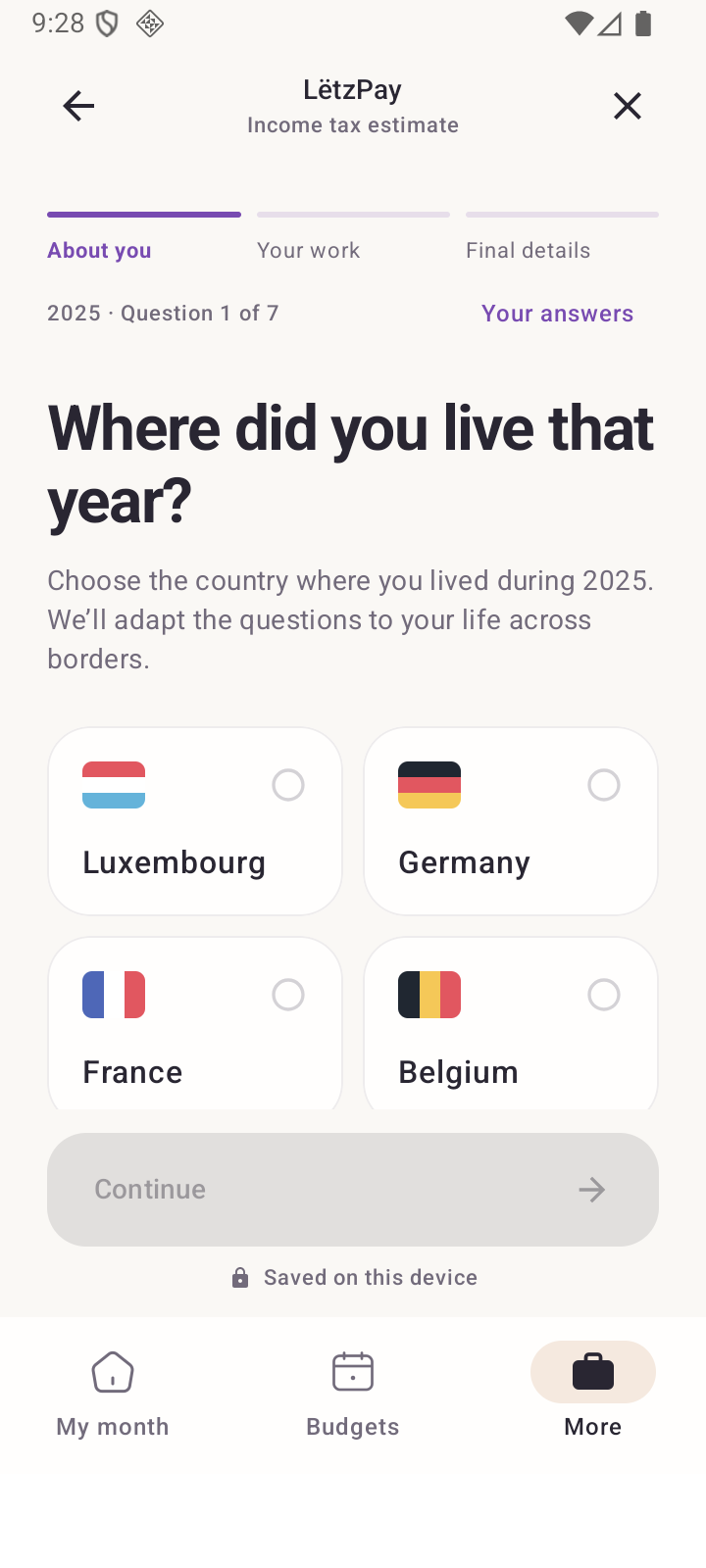
The tax preview asks for residence and household facts before showing a calculation.
Start with the facts that change the answer.
02

Read it. Then check it.

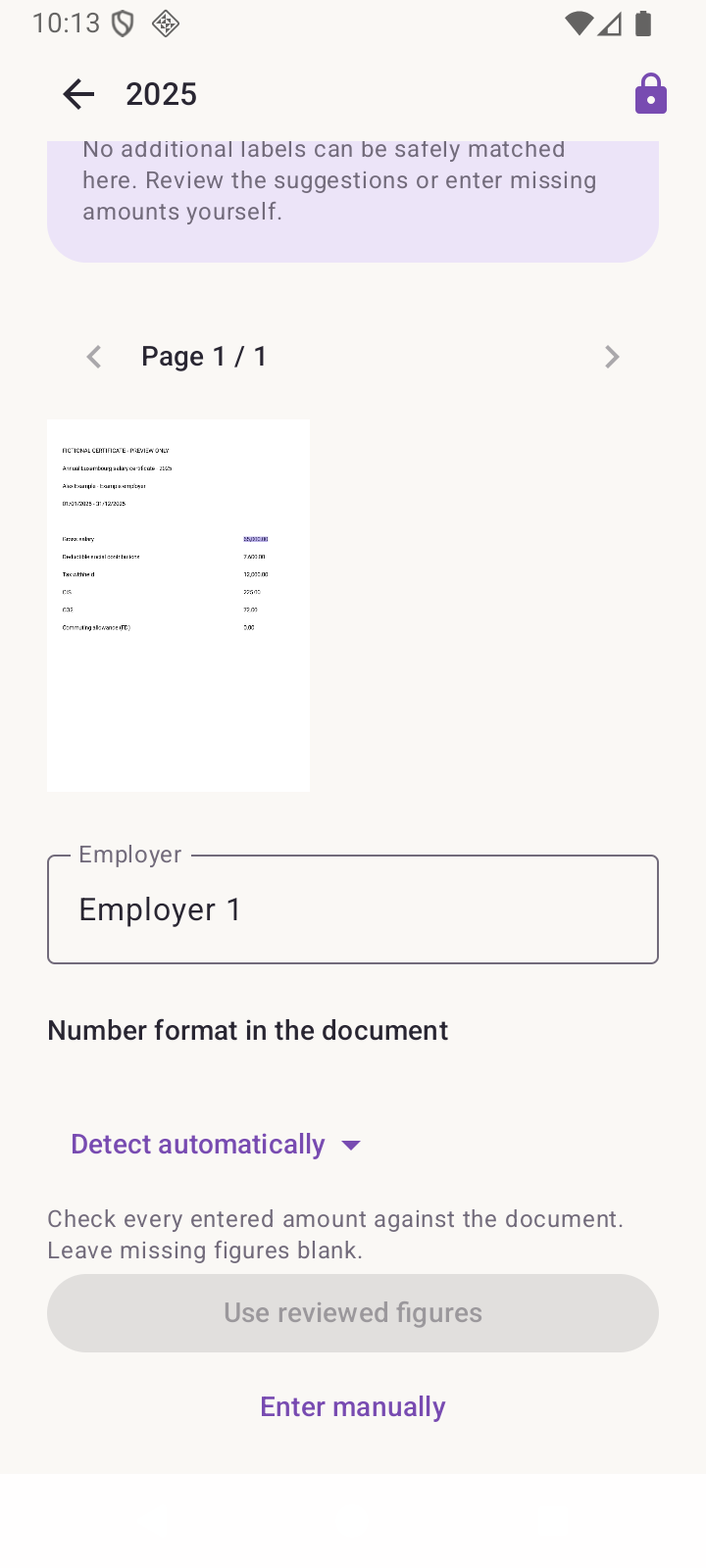
Choose one PDF, JPG or PNG salary certificate. Compare every suggested amount with the source and confirm it. You can always type a figure yourself.

A blank means unknown. Enter zero only when the document confirms zero. The progress card shows what still needs checking; nothing is applied until you choose Use reviewed figures.

Import limits: 20 MB per file. Locked or unreadable files need manual entry. A corrected certificate replaces that employer’s figures; it must not be added as another salary.

Document review shows a source excerpt, the suggested salary and an explicit confirmation control.
Automatic reading helps. You confirm the meaning.
03

See what the difference means.

For Alex’s confirmed example, the app shows €11,703 in payments credited and €10,125 estimated annual tax after salary credits: a possible €1,578 refund. The €12,000 withholding is reconciled separately with the €297 credits already paid through payroll.

Payments credited€11,703Estimated annual tax€10,125Example refund€1,578

The detail explains deductions, credits and assumptions. Save a comparison before editing; earlier comparisons stay in history and are marked when the figures change.

This is a conditional engineering example, not an approved tax assessment. LëtzPay does not submit a return or move money.

The current Android alpha shows the payments credited and estimated annual tax for a fictional refund example.
A difference you can trace back to its figures.

Explore, without changing your year

“What if I missed
an eligible expense?”

Add eligible expenses in the separate deductions step: insurance, mortgage interest, retirement contributions, donations and supported work or family expenses. Read a document, review its category and amount, or enter the figures yourself. Explore deductions lets you compare supported alternatives without changing your saved simulation.

Only test expenses actually eligible and paid in that tax year. Enter the full annual total, not an extra amount to add. The comparison recalculates the combined effect and leaves your saved dossier untouched.

Explorations are temporary. Leaving or backgrounding the app discards them. This is not a suggestion to make a new payment for a past tax year.

Keep the right kind of copy

A summary to read.
A backup to recover.

A PDF summary is a readable copy of the current result or missing-facts checklist. Preview it before sharing; the recipient can keep a copy. It does not include the original certificate.

Save & recover exports a separate password-encrypted tax file. Keep its passphrase safely: LëtzPay cannot reset it. Restore previews the contents and creates a separate copy instead of replacing your existing year.

Understand the two backup types

See the actual flow

A short walk
through Alex’s year.

Recorded in the current native test build with fictional data. It shows separate deductions, saved simulations and local AI controls. The latest Android alpha also protects tax records with your phone’s fingerprint or screen lock.

Subtitles are available in English, French and German. The app interface in the recording is English.

Read the walkthrough
  1. Bring salary certificates and supporting documents together. All figures in this walkthrough are fictional.
  2. Residence, household and work: short answers, with optional explanations when a question is technical.
  3. Salary amounts stay separate from deductions. Review imported values, or enter them yourself.
  4. Native document reading finds printed amounts. You compare each suggestion with its source before using it.
  5. Insurance, retirement savings, mortgage interest and donations have their own screen and eligibility checks.
  6. This fictional insurance document suggests 600 euros. The amount remains unconfirmed until you approve it.
  7. Compare estimated annual tax with credited payments. This is an estimate; nothing is submitted to the ACD.
  8. Preview your PDF summary before sharing. The recipient and destination are always your choice.
  9. Tax recovery uses a password-encrypted file, separate from ordinary budget backups. Restoring creates a separate copy.
  10. Check the Android model and try fictional labels on compatible phones. Document reading remains available without generative AI.
  11. Create another simulation for the same year without deleting earlier work. Rename, compare and return whenever you need.

Good to know before you begin

Useful boundaries.
Clearly explained.

Can I use my own certificate now?

Yes, in the Android tax alpha. Review every suggested amount and complete the facts the estimate needs. You can also start with fictional data. The estimate does not replace an ACD assessment, and the app never files a return for you.

Which years and situations can I explore?

The preview has a bounded 2025 calculation flow. Some confirmed married-joint, single-parent and residence-country workday examples are supported; this does not cover every cross-border situation. It may ask for explicit foreign-income or payroll-split evidence. It never invents a missing split.

Choose 2025 for a completed-year estimate, or 2026 for a forecast using expected full-year figures and that year’s rules. A forecast is not a final assessment. Foreign-country returns and unsupported income or household situations remain outside the calculation.

Does the document leave my phone?

The app reads documents locally and saves confirmed figures and source references in its encrypted tax workspace. It does not retain the original. A cloud file provider may download the file you select, and a sharing recipient may keep a copy you send.

Android’s bundled ML Kit can send technical diagnostics and usage metrics, including app/device information and processing details. This is separate from the app’s local financial records. Offline reading does not mean the device never makes network requests.

Read the privacy policy
Can AI help with deduction documents?

On compatible Android phones, optional on-device AI can help find amounts in salary and deduction documents. You choose whether to enable it; model setup may require a download through your device provider. Automatic reading can miss or misclassify an amount, so check the document and confirm every figure. Manual entry remains available.

Is my usual budget backup enough?

No. Tax dossiers are separate from budget JSON backups and local restore points. Use Save & recover inside the tax preview for an encrypted tax recovery file. Deleting a dossier does not delete files you exported elsewhere.

What should I send if I find a problem?

Send the app version, phone model, language, steps to reproduce and a screenshot made with fictional data. Do not email salary certificates, tax IDs, recovery files or passphrases.

Send preview feedback